



Complete Process for Foreigners to Register for WeChat & Activate WeChat Pay (2026 Latest)
## I. Preparation: Required Materials
1. **Mobile Number**: An overseas mobile number (ensure the correct country code is selected and it can receive international SMS; virtual/VoIP numbers are not supported) OR a Mainland China mobile number (+86).
2. **ID Document**: Valid passport / Permanent Residence ID Card for Foreigners ("Five-Star Card").
3. **Bank Card**: Overseas credit or debit card (Visa, Mastercard, JCB, American Express, etc.).
4. **Assisting Verifier**: An existing WeChat user who **actively uses the app, has been registered for at least six months, and has completed real-name verification for WeChat Pay** (registration with an overseas number often requires a friend to scan a QR code for assistance).
II. Step 1: Register for WeChat (International Version)
1. Search for **WeChat** in the Apple App Store or Google Play Store and install it (do not use modified third-party versions from domestic app stores).
2. Open the app, tap **Sign Up**, enter your name, select the appropriate **country/region code**, and enter your mobile number.
3. Receive the SMS verification code, set a login password, and complete the slider CAPTCHA.
4. A **friend assistance QR code** will likely appear: ask a WeChat friend in China to open WeChat, use the "Scan" function, and follow the prompts to complete the security verification.
5. Once verified, set your profile picture and nickname; your WeChat account registration is now complete.
Common Pitfalls to Avoid
- Do not use virtual numbers (like Google Voice); registration is highly likely to fail or result in the account being banned.
- An assisting friend can only verify one new account every 30 days; frequent assistance attempts will be restricted.
- If you fail to receive the verification code multiple times, wait 24 hours before trying again.
III. Step 2: Real-Name Verification for Non-Residents (Required to Activate WeChat Pay)
1. Go to the bottom menu: **Me** → **Services** → **Wallet**.
2. Tap **Identity Information** and select the ID type: **Passport** or **Permanent Residence ID Card for Foreigners**.
3. Upload a clear, original photo of your passport's personal information page (do not take photos of a screen or a photocopy); the name entered must match the capitalization and spelling on your passport exactly.
4. Complete the facial liveness check (blinking, shaking head) and submit for review; results are usually available within a few minutes, though it may take up to 72 hours.
5. You can only link a bank card for QR code payments after your real-name verification is approved.
## IV. Step 3: Link an overseas bank card and activate WeChat Pay
1. Go to [Wallet] → [Cards] → [Add Card].
2. Enter the overseas card number, expiration date, CVV security code, and the mobile number registered with the bank (to receive SMS verification codes).
3. Set a 6-digit WeChat Pay PIN; once linked, you can make QR code payments at offline stores, restaurants, and for taxi services.
## V. Transaction fees and payment limits
1. **Transaction fees**: No fee for single transactions of ≤200 RMB; a **3% currency conversion fee** applies to single transactions >200 RMB.
2. **Payment limits**: Maximum of 50,000 RMB per transaction/day; annual cumulative limit of 500,000 RMB.
3. Supports **domestic offline payments and Mini Program purchases only**; does not support WeChat Red Packets, personal transfers, wealth management products, or topping up the WeChat Balance.
## VI. Common reasons for failure & solutions
1. Passport verification rejected: Photo is blurry or has glare; name order is incorrect (Surname first, then Given Name, matching the passport's MRZ code).
2. Bank card linking failed: Card does not support overseas card-not-present (CNP) quick payments; registered mobile number cannot receive international SMS.
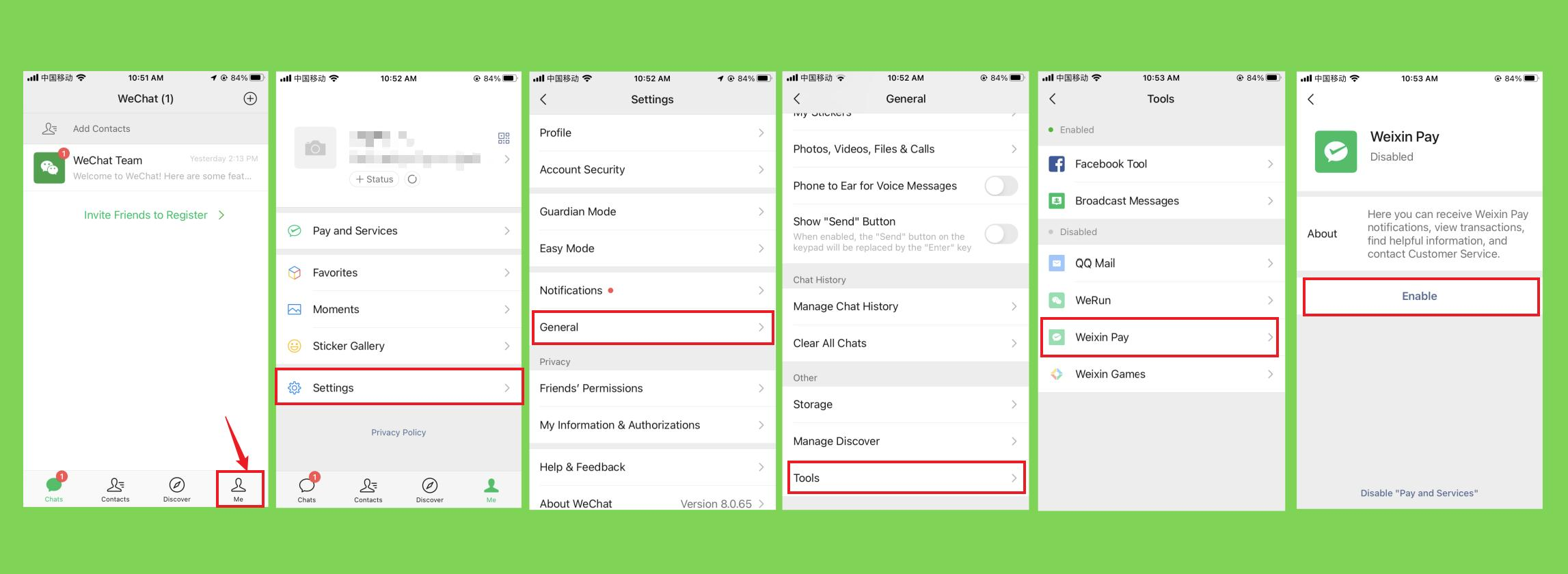
3. Cannot see the [Services/Wallet] entry: Me → Settings → General → Manage Services → Manually enable the [WeChat Pay] feature.